After earning seven Azure certifications in the past year, including AZ-400 (DevOps Engineer Expert) and AZ-305 (Solutions Architect Expert), I wanted a new challenge: my first hands-on Kubernetes certification, the Certified Kubernetes Administrator (CKA).
I've worked with AKS in production for over five years, which gives me a head start: I already understand most of the concepts the CKA covers. What I'm missing is the hands-on installation and detailed configuration, since AKS abstracts all of that away as a managed service. That's exactly the gap I want to close.
The CKA isn't multiple choice. You're dropped into a terminal with a handful of Linux VMs and a list of tasks: no pre-installed cluster, no GUI. You install Kubernetes and its components yourself, configure everything through the CLI, and troubleshoot whatever breaks, all under time pressure.
I always learn best by doing, which is also why I built and shared a side project while preparing for AZ-400. So for the CKA, I'm taking the same approach: building my own two-node Kubernetes lab on Azure VMs in a Whizlabs Azure sandbox, rather than relying only on videos and labs.
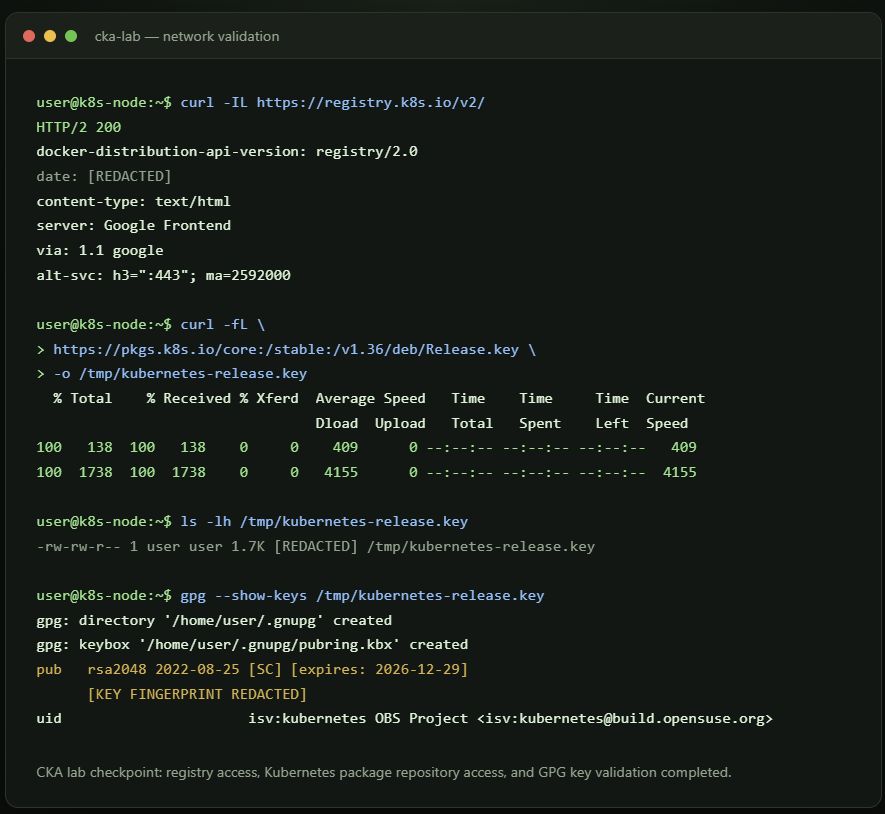
First, I had to verify whether this setup was even possible within the sandbox, both technically and permission-wise.
So far, I have:
- Created and tested Ubuntu 24.04 virtual machines.
- Configured a dedicated Azure VNet and subnet.
- Restricted SSH access through an NSG.
- Connected securely through Azure Bastion.
- Verified private connectivity between the nodes.
- Confirmed outbound DNS and HTTPS access.
The sandbox turned out to be a great fit: it's cheap and gives a much richer hands-on experience than a lab. The catch is that each session lasts a maximum of 3 hours, so I need to automate the setup if I want to spin up a fresh environment quickly and get straight into practicing instead of losing time to manual configuration.
That's why my next step is automating the environment with an infrastructure-as-code Bicep template and installation scripts to configure:
- containerd
- kubeadm
- kubelet
- kubectl
And this gives me also extra practice as a DevOps engineer, using Bicep and Powershell, something I really enjoy doing.
After the base is running and configured, I'll bootstrap the cluster, install a CNI, and begin practising real administration and troubleshooting tasks.
I'll share my exact steps and scripts on Thursday.
How did you prepare for CKA?