Debugging EF Core SQL with TagWith()
This is the same concept as WithName() (adding labels for debugging, see my previous post), but on SQL queries instead of async tasks.
The problem: You need to find which LINQ query is taking too many resources or generating slow query plans.
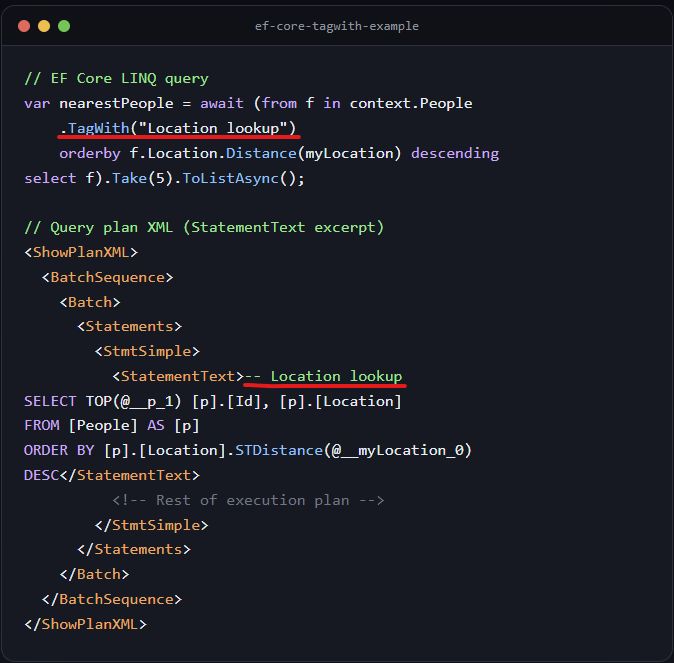
The trick: Tag your queries so they appear in generated SQL:
var nearestPeople = await context.People
    .TagWith("Location lookup")
    .OrderByDescending(f => f.Location.Distance(myLocation))
    .Take(5)
    .ToListAsync();
Generated SQL:
-- Location lookup
SELECT TOP(@__p_1) [p].[Id], [p].[Location] FROM [People] AS [p] ORDER BY [p].[Location].STDistance(@__myLocation_0) DESC
Why this helps:
- Find which query is taking too many resources (e.g., slow SQL query).
- Pinpoint which LINQ query is generating bad query plans.
- Match slow SQL in query logs to your code.
Sample query to see which queries had high logical I/O:
DECLARE @StartTime DATETIME = '2026-05-14 08:00'; DECLARE @EndTime DATETIME = '2026-05-14 09:00';

SELECT
    qt.query_sql_text,
    rs.avg_logical_io_reads,
    rs.count_executions,
    rs.avg_duration,
    q.query_id,
    qt.query_text_id
FROM sys.query_store_query_text qt
JOIN sys.query_store_query q ON qt.query_text_id = q.query_text_id
JOIN sys.query_store_plan p ON q.query_id = p.query_id
JOIN sys.query_store_runtime_stats rs ON p.plan_id = rs.plan_id
WHERE rs.last_execution_time BETWEEN @StartTime AND @EndTime
ORDER BY rs.avg_logical_io_reads DESC;
Detect slow query plan:
DECLARE @query_id BIGINT = <your_query_id>; -- From Query 1 result

SELECT
    qsq.query_id,
    qsp.plan_id,
    TRY_CONVERT(XML, qsp.query_plan) AS query_plan_xml, -- Convert to XML for readability
    qsrs.runtime_stats_interval_id,
    qsrs.execution_type,
    qsrs.avg_duration,
    qsrs.avg_cpu_time,
    qsrs.avg_logical_io_reads,
    qsrs.count_executions,
    qsws.wait_category_desc,
    qsws.avg_query_wait_time_ms,
    qsws.stdev_query_wait_time_ms
FROM sys.query_store_query AS qsq
JOIN sys.query_store_plan AS qsp ON qsp.query_id = qsq.query_id
JOIN sys.query_store_runtime_stats AS qsrs ON qsrs.plan_id = qsp.plan_id
JOIN sys.query_store_wait_stats AS qsws ON qsws.plan_id = qsrs.plan_id
    AND qsws.execution_type = qsrs.execution_type
    AND qsws.runtime_stats_interval_id = qsrs.runtime_stats_interval_id
WHERE qsq.query_id = @query_id
ORDER BY qsrs.runtime_stats_interval_id DESC, qsws.wait_category_desc;
Result:
<ShowPlanXML>
  <BatchSequence>
    <Batch>
      <Statements>
        <StmtSimple>
          <StatementText>-- Location lookup
SELECT TOP(@__p_1) [p].[Id], [p].[Location]
FROM [People] AS [p]
ORDER BY [p].[Location].STDistance(@__myLocation_0) DESC</StatementText>
          <!-- Rest of execution plan -->
        </StmtSimple>
      </Statements>
    </Batch>
  </BatchSequence>
</ShowPlanXML>