This blog has been read-only from a visitor's perspective since day one. Articles come from me (or from Claude, on request), and that was fine for a while. But a comment section is one of those features that looks trivial from the outside and isn't: the moment you accept anonymous input, you've taken on spam, abuse, and rate-limit problems that a single-author blog never had to think about.
So here's what building it actually involved.
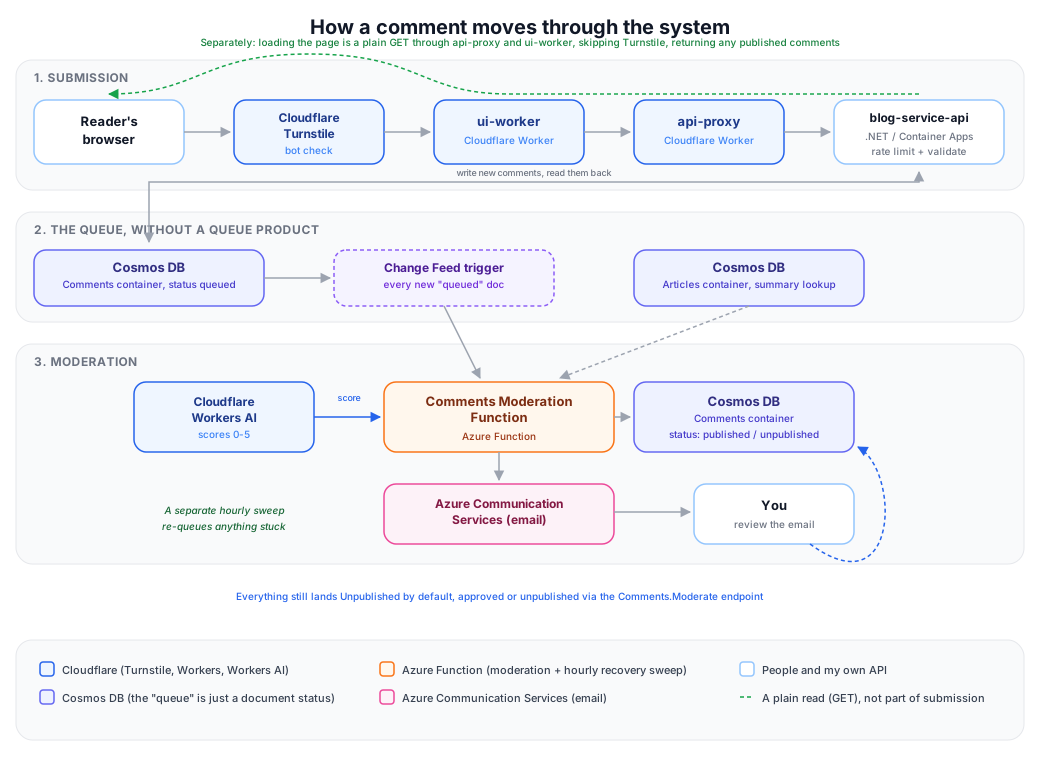
The shape of it
A comment goes through four systems before it's visible to anyone:
- Cloudflare Turnstile on the form itself, verified server-side before the submission goes anywhere.
- A rate limiter on the API, keyed by real visitor IP and article slug, tight enough to stop abuse, loose enough that someone commenting on three different posts in one evening doesn't get blocked.
- The comment lands in Cosmos DB with status
queued. Nothing is published yet. - A new Azure Function picks it up, scores it with an LLM, and either publishes it or leaves it for me to review by hand.
That last part is the interesting bit. Instead of adding a message queue to move comments from "submitted" to "being moderated," the Cosmos document is the queue entry. A Cosmos DB Change Feed trigger picks up every new queued comment automatically. No separate queue product, no extra thing to pay for or operate.
I didn't land on that by default, either. My first instinct was to reach for Azure Storage Queue or Service Bus. Both have a real cost risk worth knowing about: a Function trigger polls the queue independently on every scaled-out instance, so the bill scales with instance count, not with how many messages you actually have. That's easy to miss until it shows up on an invoice. Cosmos's Change Feed doesn't have that failure mode: checking for new documents is billed as ordinary throughput consumption against a database I'm already running, not a separate meter that can quietly multiply.
The moderation loop
The Function calls Cloudflare Workers AI to score each comment from 0 to 5. Offensive content, spam, and low-effort garbage score low; genuine engagement scores high, even if it's critical. That's a deliberate choice, not just "whatever's cheap": I use Workers AI across my other projects too, and calling it from an Azure Function is itself a small cross-cloud integration exercise, which is more interesting to me than defaulting to whatever's already in the same cloud.
Every score comes with an email notification, and for now, every comment lands Unpublished regardless of score. I'm the one deciding what goes live, at least until I trust the model's judgment enough to change one setting: a single "auto-publish above this score" threshold, currently set above the maximum possible score so nothing auto-publishes by accident. Lowering that number later is a config change, not a redeploy.
The model, the prompt, and the daily scoring quota are all runtime settings too, not hardcoded. I expect to tune the prompt more than once before I trust it.
How approval works, today and later
Right now, publishing a flagged comment is a manual step. The review email carries the comment's text and the score with a short explanation, and I decide from there. In practice that means asking Claude to publish it through the same moderation endpoint that handles everything else on this project, since Claude is already doing most of the day-to-day work here anyway.
That's deliberate for now. The auto-publish threshold exists, but it's set above the highest score the model can give, so nothing goes live without me looking at it first, no matter how confident the model is.
Once I trust the model's judgment on a real spread of comments, not just a handful of test messages I wrote myself, I plan to lower that threshold so genuinely good comments publish immediately. At that point the review email stops being a request for action and becomes more of an FYI. The useful one-click action flips too: instead of a link to approve something waiting for me, the plan is a link to undo something the model already published, in case it turns out to have been wrong. Same mechanism either way, a single signed link in the email that does one thing without needing me to log into anything first. Just not built yet.
That fits the general shape of how I built the rest of this: start with the simplest version that keeps a human in the loop, and only add automation where it's actually earned it.
Keeping automation on a short leash
Every new piece of infrastructure needs permissions, and this is the part I actually spent the most time getting right. The Function's identity needs to read and write specific Cosmos containers, read from a storage account, and publish telemetry, each of those is its own narrowly-scoped role, not a blanket "Contributor" grant.
Deploying it hit a wall I hadn't planned for: the GitHub Actions pipeline that provisions the infrastructure doesn't have permission to grant permissions to others. Creating resources and assigning roles are different, separately-gated capabilities in Azure. The obvious fix is a built-in role called "Role Based Access Control Administrator," built for exactly this. I decided not to use it. Automation that can create resources is one thing; automation that can hand out access is a different risk profile, and I'd rather run four az role assignment create commands by hand once than give a CI pipeline a permission I don't strictly need it to have.
What actually went wrong
Real bugs made it to production, all caught by just using the feature after deploying it rather than trusting the design on paper:
- The comment form had no
actionattribute. Without one, a browser submits to whatever page it's currently on, which is a read-only route, instead of the endpoint that actually accepts the comment. Every submission quietly 404'd. My own pre-launch testing had posted to the real endpoint directly withcurl, which proved the backend worked and told me nothing about whether the actual HTML form pointed at it. - The "your comment is being reviewed" message stayed on screen forever, even after a refresh, because it was carried in the URL as
?comment=success, and nothing ever removes a query parameter from an address bar on its own. Fixed with a short-lived cookie instead: read once, then deleted, so the next page load starts clean. - The Cloudflare API token behind the scoring call turned out to be invalid. Every comment sat at
queuedindefinitely, and every attempt failed silently until I went looking at the Function's own logs. - That failure exposed a second, separate bug: the daily scoring quota was being spent even when scoring failed, since the quota check ran before the Cloudflare call rather than after a successful one. A run of failures could silently burn through the whole day's allowance without moderating a single comment. Fixed by only consuming a quota slot once scoring actually succeeds.
- Once real scoring calls started going through, a response came back scored 0, with the raw text
{"score": 3, "reason": "Low", cut off mid-sentence with no closing quote or brace. Workers AI's own default response-length limit for this model was cutting generation short before it finished even that tiny shape. Fixed with an explicit token cap plus tighter prompt wording asking for a short response. - Immediately after that fix, another response came back well-formed but still failed to parse, because the model wrote the score as
"1", a quoted string, instead of1, a number. The parser rejected it outright even though the intent was completely clear. Widened it to accept both. - The model was also only ever given a comment's raw text, never anything about the article it was posted on, so asking it to judge "on-topic reader engagement" wasn't a fair ask in the first place. Adding a lookup that feeds the article's summary in alongside the comment fixed that gap, but immediately caused its own bug: the model started critiquing the article's own quality instead of judging the comment, confusing the background I gave it with the thing it was supposed to score. Fixed with much louder labeling in the prompt: this part is background, this part is what you're scoring, don't mix them up.
None of these are dramatic failures. All of them are the kind of thing that's obvious in hindsight and invisible until someone actually clicks the button, or until real traffic finally reaches a code path a test never did.
Where it stands
By the time all of the above was fixed, a different kind of problem was obvious: the model itself, a 1-billion-parameter one, kept finding new small ways to be unreliable that no amount of prompt tweaking or parser hardening was going to fix. Real examples from one afternoon of testing: a comment scored 0 while the model's own stated reason argued the opposite ("extremely low-risk... no problematic content"), a comment scored 4 with a reason that just echoed the comment's own wording back as if it were the model's own reasoning, and a comment accused of containing "a link to a website that may be a scam," when it contained no link at all. That's a capability ceiling, not a bug.
Switched to an 8-billion-parameter model instead, still on Workers AI, still cheap. Re-ran the same kind of test batch: genuine positive comments scored high with reasoning that actually matched what they said, an actual spam comment correctly scored 0, and the model stopped hallucinating things that weren't there. A real improvement, not a marginal one.
One honest caveat: bigger doesn't mean perfect. The same internal test comment that broke the pipeline twice earlier got rescored 5/5, with the reason "a relevant and on-topic confirmation of the article's content." That's generous, not accurate. It's an engineering note, not genuine reader engagement with the topic. The model isn't hallucinating anymore, but "on-topic" still looks more like default leniency toward anything inoffensive than a rigorous check. Worth knowing before I ever trust it enough to auto-publish anything.
So: the pipeline works, end to end, for real, today. Whether it's good enough to eventually take me out of the loop for the easy cases is still an open question, one I plan to answer with real reader comments rather than more test messages I write myself.
Try it out yourself by leaving a comment below!